Sandboxing agentic coding tools is a networking problem
Allowlisting commands on a trusted host for an agentic coding tool can be somewhat fraught. Taking inspiration from Simon Willison:

Sandboxes help us reason about their relation to the lethal trifecta:

- What untrusted content is the sandbox exposed to?
- How can they externally communicate?
- What sensitive data are we providing to the sandbox?
Anthropic provides several sandboxing tools specific to Claude Code:
Cursor also has a similar sandboxing feature for Mac users that uses sandbox-exec under the hood for the Cursor IDE. OpenAI’s Codex CLI also supports a sandbox argument that uses sandbox-exec. We’re super excited to see all the new tools to limit what access these agentic coding tools have to our host!
You could also write your own sandbox using gVisor or Firecracker VMs! The themes around network isolation and proxies should transfer.
What is the worst a sandbox can do?
Although the specifics of the sandbox technology affect the level of isolation, a sufficiently sandboxed Claude Code can make a sandboxed Claude Code look like a separate host.
- What network access am I allowing Claude Code to have?
- What actions can Claude Code perform with this network access and the data it has?
For example, almost all Claude Code instances have access to Anthropic API keys to be able to interact with the Anthropic API.
Claude Code has access to all environment variables present in your terminal session (which are propagated to the Claude Code sandbox), and Claude Code has access to read the files from the directory where you run claude.
Unfortunately, a lot of software requires secrets. For example, development on third-party integrations requires using secrets.
This makes having separate development, staging, and production integration credentials especially valuable, but even development integration credentials are not designed to be publicly accessible: otherwise, they wouldn’t be credentials!
- What data am I providing to Claude Code?
- What secrets or environment variables will Claude Code have access to?
- Are the files (including the source code) I’m providing to Claude Code open-source or public?
Consider the precedence of dotenv files to manage secrets on your local repo. Making sure that these .env files are properly .gitignored and .dockerignored is no longer sufficient: leaving these .env files in a folder where you are running claude gives Claude Code access to these secrets.
You could also write your own sandbox using gVisor or Firecracker VMs! The themes around network isolation and proxies should transfer.
Unpacking the devcontainer firewall
The provided devcontainer template has an init-firewall.sh script that applies a firewall to the devcontainer running Claude Code. This firewall permits network connections to the following hosts by default:
This firewall is enforced at the IP layer: the init script performs a dig to resolve these hosts’ IP addresses and uses iptables to allow connections to these IPs. This does mean that the particular connection to these hosts is not necessarily enforced at the TLS/HTTP layers; for example, an AWS ALB on an allowlisted IP that routes traffic based on SNI or Host headers could still receive requests that specify different hosts.
In addition, the firewall supports inbound and outbound traffic to any IP address on port 22 for SSH connections.
If we:
- Use this firewall
- Provide environment variables we would not want to be publicly accessible
- Run the devcontainer with claude –dangerouslyUnsafePermissions
The devcontainer could exfiltrate sensitive data, including credentials, via a
variety of ways:
- Connect to a random IP over port 22
- Create an npm package with the secret in the tarball
- Create a github gist with the credentials
Even if we only HTTP traffic to a select set of hosts, this problem remains challenging because of Domain Fronting: there are often a huge diversity of actions you can perform on a single domain. Applying restricted privileges to these kinds of domains at the IP, domain, or even host level is often not fine-grained enough to allow the actions you want to allow and block the actions you want to block. In fact, prompt injection attacks in particular have taken advantage of overly broad domain allowlists to exfiltrate sensitive information!
The specifics of what kind of network traffic you want to permit and not permit often requires looking at the application layer.
Using network proxies to prevent secrets exfiltration: hiding the ANTHROPIC_API_KEY from Claude Code
Thankfully, Claude Code supports using proxies to route traffic! There are two ways to configure Claude Code to use proxies:
Note that these proxy configurations are independent of each other: the HTTP_PROXY environment variable will not intercept HTTP traffic from bash commands in the sandbox, and the sandbox httpProxyPort will not intercept HTTP traffic from the Claude Code CLI tool that is outside of the sandbox.
You can configure Claude Code to use an HTTP proxy using the following configuration in settings.json:

mitmproxy is a great tool to run these HTTP proxies. Note: provide the mitmproxy-generated TLS certificate to intercept TLS traffic to Claude for node processes via export NODE_EXTRA_CA_CERTS=~/mitmproxy/mitmproxy-ca-cert.pem.
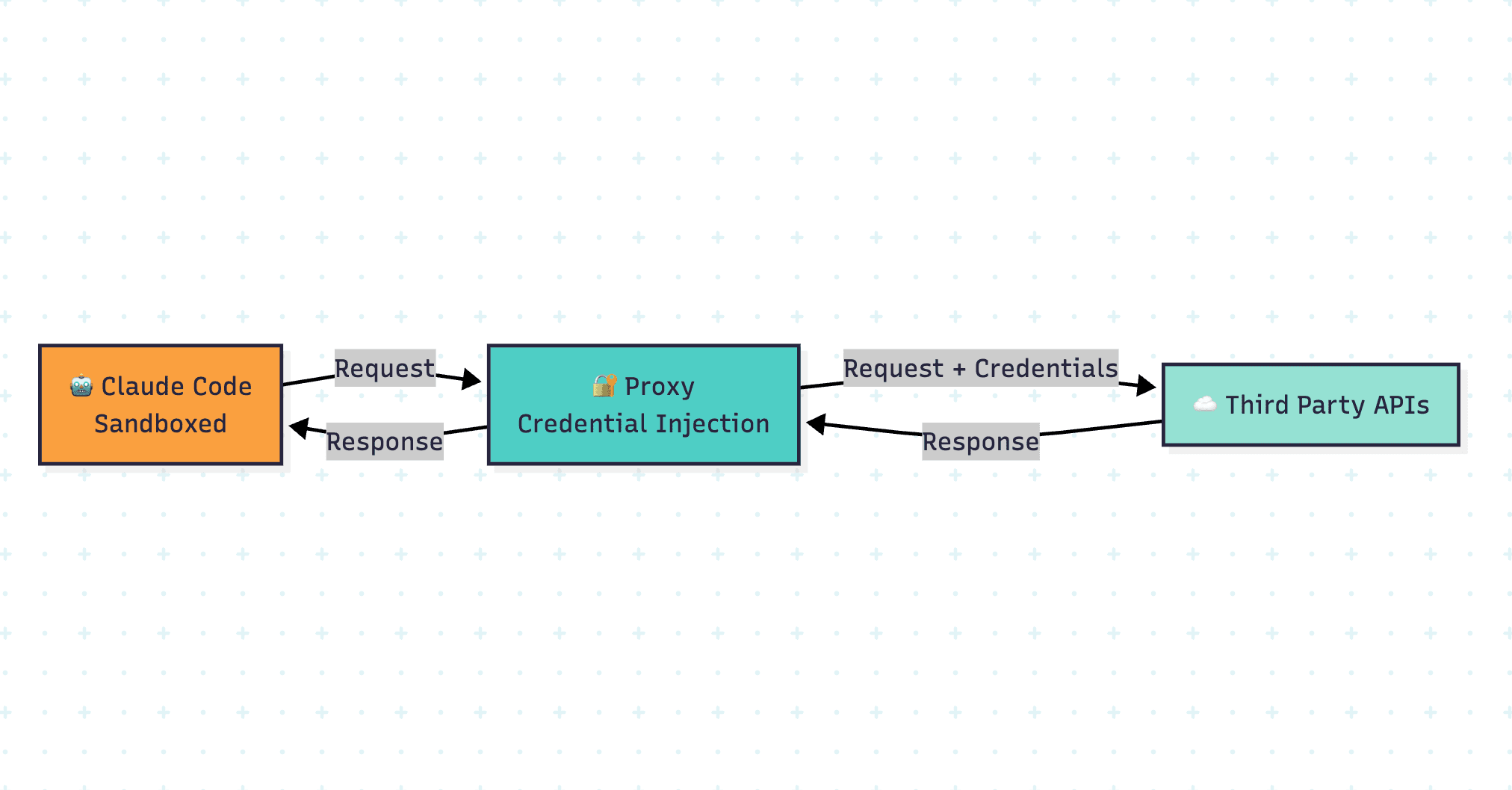
The mitmproxy tool also supports addons where you can transform HTTP requests between Claude Code and third-party web servers. For example, you could write an add-on that intercepts https://api.anthropic.com and updates the X-API-Key header with an actual Anthropic API Key.
You could then pass an invalid Anthropic API Key to Claude Code so that neither the Claude Code process nor the sandbox has access to our Anthropic API Key!

You could then run mitmweb with the right API key:

Afterwards, run claude with the ANTHROPIC_API_KEY environment variable set to an invalid API key:

From the perspective of Claude Code, all API responses from api.anthropic.com will appear to Claude Code as if the API key of sk-ant-dummy is a valid API key!
Unfortunately, Claude Code still requires signing in via OAuth before checking if the ANTHROPIC_API_KEY is set, so you may have to sign in via OAuth first, grab the API key, close the session, and then start a new claude process with an invalid ANTHROPIC_API_KEY environment variable.
This kind of technique is not unique to hiding your Anthropic API Keys: you could insert dummy API keys and secrets and use mitmproxy addons to intercept these HTTP requests and inject actual API keys once the request has left the Claude Code process and sandbox.
Tying a developer’s permissions to their Claude Code permissions: proxying Claude Code to the Formal Connector
Our customers use Formal to apply least privilege to both human and machine identities. You can also leverage Formal to decouple human & machine identities from Native Users and apply fine-grained least privilege at the application layer. A lot of the techniques to apply organizational least privilege are relevant for applying least privilege to Claude Code sandboxes: if your organizational permissions are sufficiently constrained, the blast radius of a rogue Claude Code with a developer’s credentials should be small as well.
To date, Admin Anthropic API Keys inherit the full permissions of the user who created them, and there is no ability to make API keys more fine-grained. API keys generated from the Claude API for Claude Code, however, seem to have restrictions on what API endpoints they are allowed to use, but we have not found documentation on the exact permissions that are allowed versus disabled.
Developers may want to use Claude Code to write and run code that uses an Admin Anthropic API Key. If they pass the API Key via an environment variable, the sandbox will have access to this Admin Anthropic API Key. An organization, however, may want to prevent certain API actions from being taken with an Anthropic API Key and have logging on who is performing which API actions. Developers may not notice the distinction as well!
The best way to prevent Claude Code from leaking an API Key is to make sure that it never has direct access to the credentials in the first place! One can use Formal Connectors, Formal Resources, and Native Users to make sure that Claude Code cannot leak the API Key. That way, Claude Code can make requests to the Connector with Formal-specific credentials and the Connector can inject actual secrets when communicating with the upstream API.
When hostnames and headers are hard to edit: mitmproy add-ons
For hostnames and headers that are hard to tweak, use mitmproxy add-ons to route the HTTP requests for these domains to the corresponding listener.

You can then pass this add-on via mitmproxy -s reroute_hosts.py.
One advantage of this approach is that you do not have to configure hostnames and ports for Claude Code: the default hostnames and ports for these APIs will look identical from the perspective of Claude Code.
Applying fine-grained least privilege policies
We could then create a policy in a similar way to the policy we created for the local Github MCP server use case.

If we change the path param to “/v1/messages,” we can confirm that this policy is able block requests to the Anthropic API even outside of the Claude Code sandbox:

We also get visibility into every request being made to the Anthropic API across our organization!

Of course, this technique was not specific to safeguarding Anthropic API Keys: one can use HTTP proxies and Claude Code sandboxes to enforce least privilege for your API Keys even if you want to enable Claude Code to use some of these APIs!
Proxies as a result can help in two dimensions of the lethal trifecta:
- Proxies can limit the ability to externally communicate by allowing or blocking traffic.
- Proxies can also limit an agent’s access to private data if they don’t need to read that data for inference. Credentials can be injected for actions the agent wants to take with those credentials without allowing the credential to be available to a language model’s context window.