A technical quest through obscure SSH and AWS Session Manager features in service of enabling VS Code Remote SSH via the Formal Connector, culminating in forking and fixing several concurrency bugs in AWS's own reference library for connecting to compute instances using SSM.
Formal's SSH connector
Formal helps security teams better understand and control the flow of data around production infrastructure. The Formal Connector, a protocol-aware reverse proxy typically deployed as a single binary in a container, is at the core of this approach.
Today, Formal customers who deploy the Formal Connector in their cloud environments can use it as an SSH proxy. Uniquely, the Formal Connector supports connecting to remote hosts not only via the SSH protocol, but also via AWS SSM, which allows connecting to AWS EC2 and ECS Fargate compute instances without needing to install SSH keys or deal with machine user passwords — a security advantage.
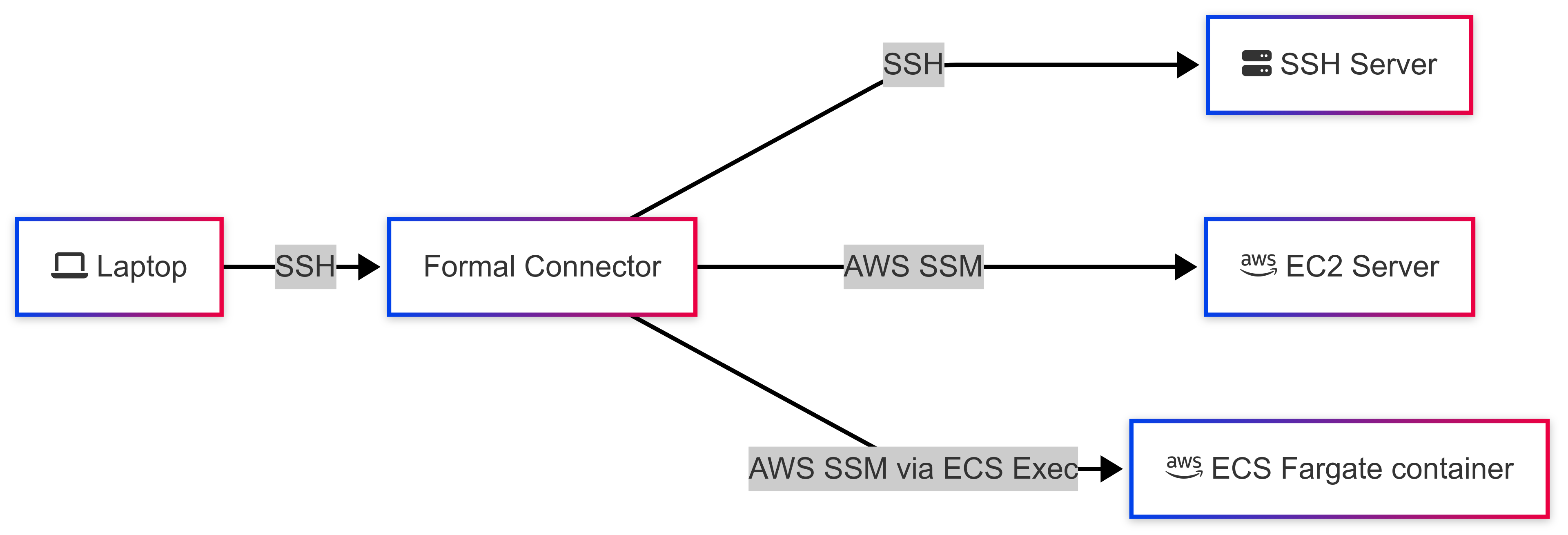
When users SSH into the Formal Connector, they are presented with a TUI menu in which they can select an SSH, EC2, or ECS Fargate host they can connect to. Alternatively, they can also connect directly to a remote host of their choice by running a command against the Formal Connector.

Depending on the remote connection type, the Formal Connector then initiates an SSH or SSM connection to the remote host, and then proxies user input and shell output between the client SSH stream and the remote SSH or SSM stream.
// Proxy bytes between client and remote SSH streams
go func() {
    io.Copy(remoteChannel, clientChannel)
    remoteChannel.Close()
}()
go func() {
    io.Copy(clientChannel, remoteChannel)
    clientChannel.Close()
}()
This enables a number of features that security teams might find convenient: they can leverage Formal's policy engine to restrict access to production-sensitive hosts to a subset of users, and they can ensure the entire SSH session, including commands and their outputs, are fully logged and analyzed for their risk level.
Remote SSH Development with VS Code
The Remote SSH extension in VS Code allows users to "open a remote folder on any remote machine, virtual machine, or container with a running SSH server and take full advantage of VS Code's feature set" across the entire remote host's file system. This gives users the ability to interact with code on a remote machine almost as if it was a local one, including with code completions and debuggers.
To provide this "local-quality" experience, VS Code relies on more than just the standard shell stream provided by SSH. There are a number of steps that VS Code takes to prepare a remote SSH host for remote development.
VS Code establishes an SSH connection to a remote host and runs a shell script against this connection. This setup script first downloads the Code Server binary onto the remote host, then starts the Code Server bound to a random port on the remote host listening on localhost only. VS Code then looks for the Code Server binary to print out the random port in the SSH connection, at which point it asks the remote host to initiate two TCP port forwards (for redundancy) of that port back to the local machine. Once these TCP tunnels are established, VS Code can enable all of its features for the user.
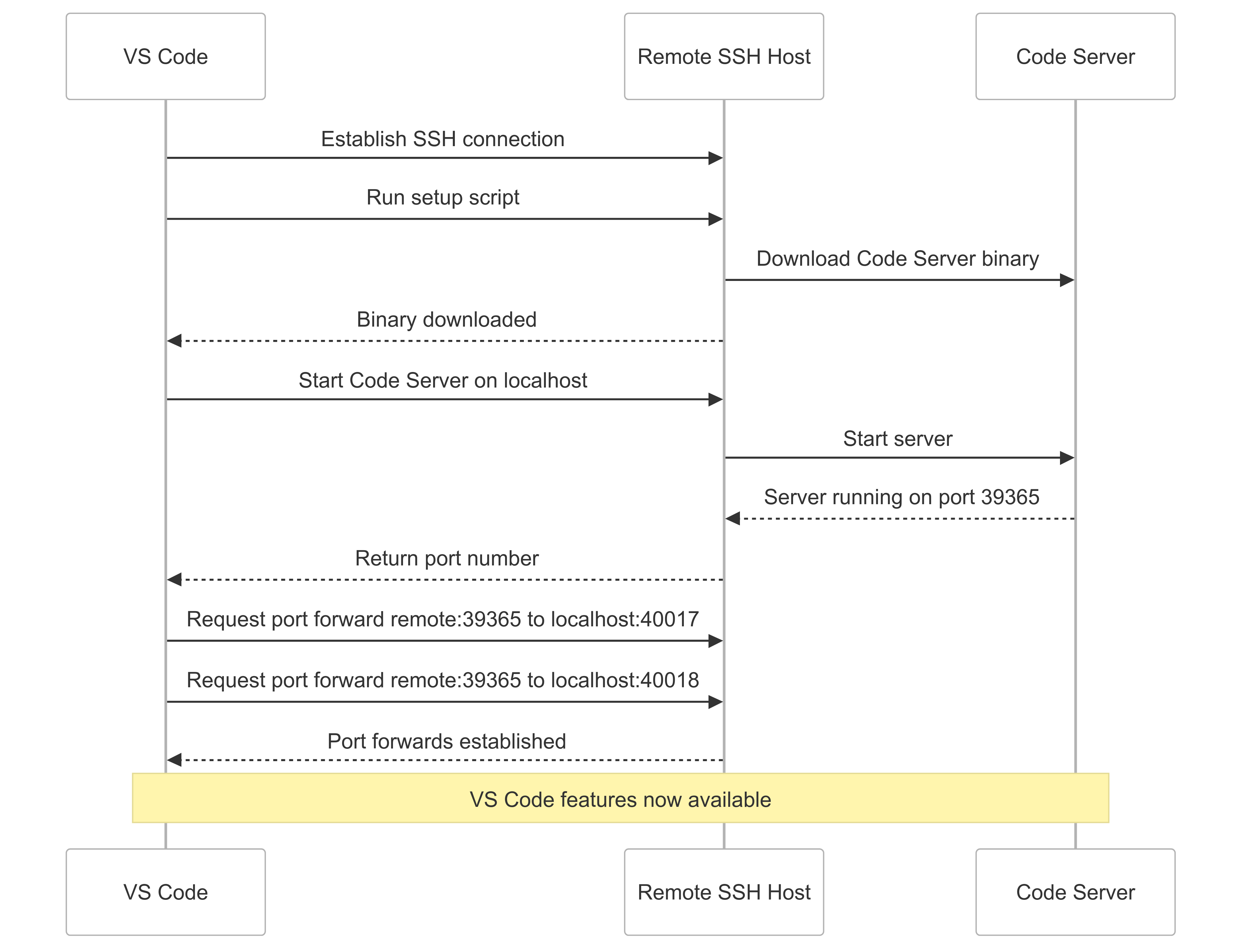
The key part of this flow is the SSH port forwarding step. The SSH protocol supports a number of different multiplexed channel types: the canonical login shell channel is of type session, but there's also a direct-tcpip channel type that can be used for client-initiated forwarding of server ports. This is the channel type that powers SOCKS proxies, for example. Note that the client doesn't need to declare the port forward at the beginning of the session, but can rather open arbitrary port forwards at any time during the session.
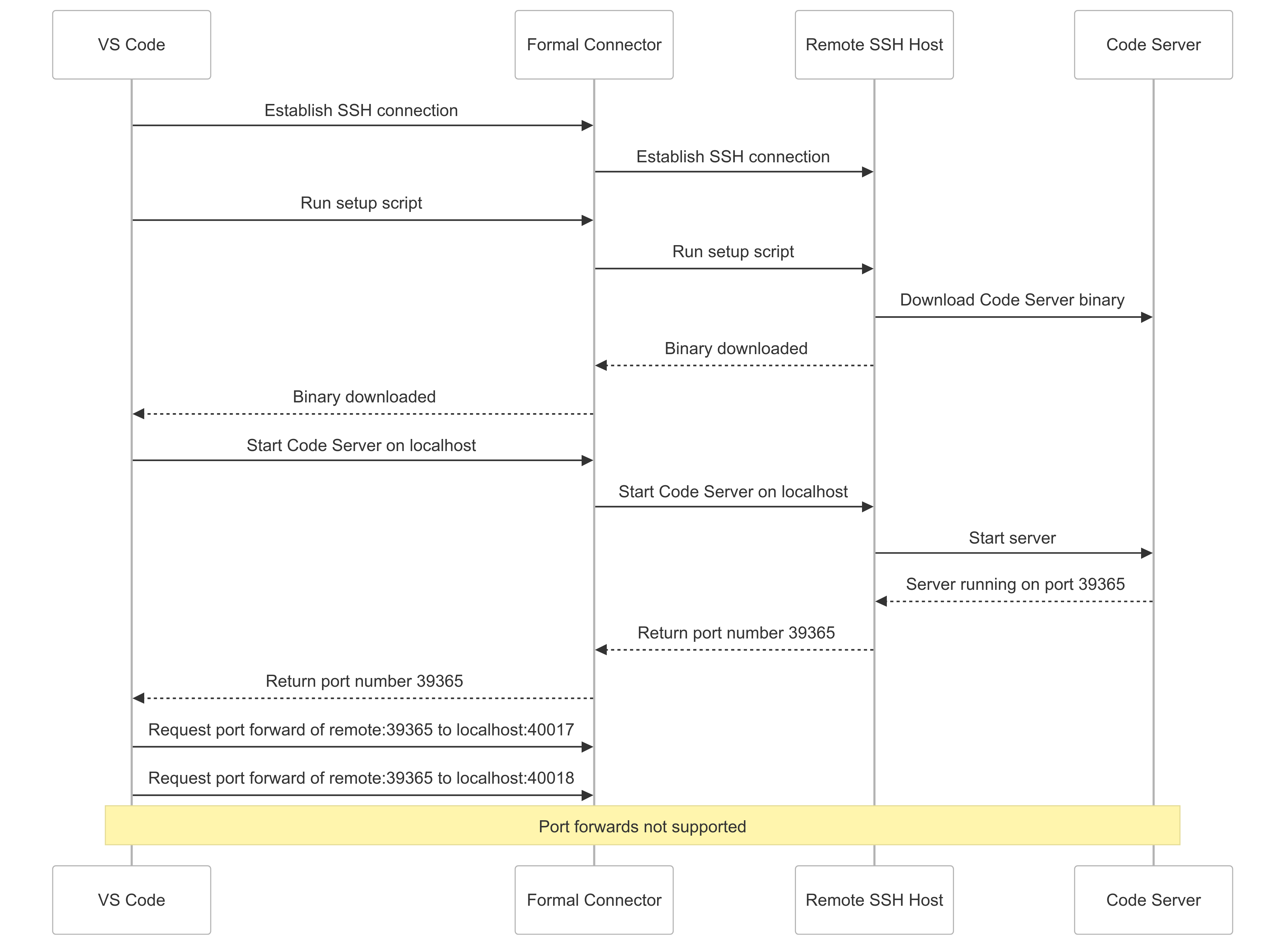
Prior to this work, the Formal Connector didn't yet support TCP/IP forwarding over SSH. Thus, when VS Code was trying to initialize the Code Server on a remote machine via the Formal Connector, the flow failed. When VS Code requested the port forward of the remote Code Server port, the Formal Connector didn't know what to do with that request! Thus, anyone attempting to use VS Code Remote SSH via the Formal Connector would simply see their code editor freeze indefinitely while trying to set up the remote machine.
Implementing support for TCP/IP forwarding for SSH remotes
The Formal Connector's SSH support is based on the Charm Wish framework for building SSH apps (the same framework that powers terminal.shop, for example). This framework takes care of most of the undifferentiated heavy lifting of the SSH protocol and allows us to focus on implementing Formal's unique policy and audit system as a middleware. Once a client SSH connection is established, the connector works with the abstraction of the connection as a byte stream and can proxy bytes back and forth between the client and remote (established using either Go's crypto/ssh standard library, or a custom data channel library in the SSM case) connections.
Fortunately for us, the Wish framework and crypto/ssh have native support for direct-tcpip SSH channels for port forwarding. Implementing support in the Connector was thus relatively straightforward. The client's port forwarding request can be forwarded to the remote server, giving us two io.ReadWriteCloser interfaces that we could easily pass data back and forth between. In Wish, we simply register this function as a channel handler, and the framework takes care of the rest.
// Register the direct-tcpip channel handler for port forwarding
srv.ChannelHandlers["direct-tcpip"] = handleDirectTCPIP
srv.LocalPortForwardingCallback = func(ctx ssh.Context, dhost string, dport uint32) bool {
    log.Info().Msgf("Allowing local port forwarding request: %s:%d", dhost, dport)
    return true
}

func handleDirectTCPIPWithRemoteSSH(newChannel gossh.NewChannel, ctx ssh.Context) {
    d := localForwardChannelData{}
    if err := gossh.Unmarshal(newChannel.ExtraData(), &d); err != nil {
        newChannel.Reject(gossh.ConnectionFailed, "error parsing forward data: "+err.Error())
        return
    }

    client := ctx.Value("remoteSSHClient").(*gossh.Client)
    remoteChan, remoteReqs, err := client.Conn.OpenChannel("direct-tcpip",
        gossh.Marshal(d))
    go gossh.DiscardRequests(remoteReqs)

    ch, reqs, _ := newChannel.Accept()
    go gossh.DiscardRequests(reqs)

    go func() { io.Copy(remoteChan, ch); remoteChan.Close() }()
    go func() { io.Copy(ch, remoteChan); ch.Close() }()
}
Once this was implemented, it was now easy for users to perform port forwarding through the Formal Connector. For example, a stub HTTP server on http://localhost:9000 on a remote machine could be port forwarded via the Formal Connector and accessed from a laptop.
# Forward remote port 9000 through the Formal Connector
$ ssh -L 9000:localhost:9000 user@formal-connector

# In another terminal, access the forwarded port
$ curl http://localhost:9000
Hello from the remote server!
The AWS Session Manager Protocol
The next step was to implement SSH TCP/IP forwarding for AWS SSM remotes. Before explaining how we did that, I'll walk through how the protocol actually works. Unfortunately, the SSM protocol is poorly documented, but the reference client and server implementations are fortunately open-source.
The SSM protocol can be described as "byte streams encapsulated in JSON with sequencing, encapsulated in a custom binary protocol with sequencing, over WebSockets." It's a fairly complex protocol that can handle multiple types of sessions, including interactive and non-interactive shell sessions and commands, as well as port forwarding from local (the machine where the agent is installed) and remote (elsewhere in the AWS environment) hosts.
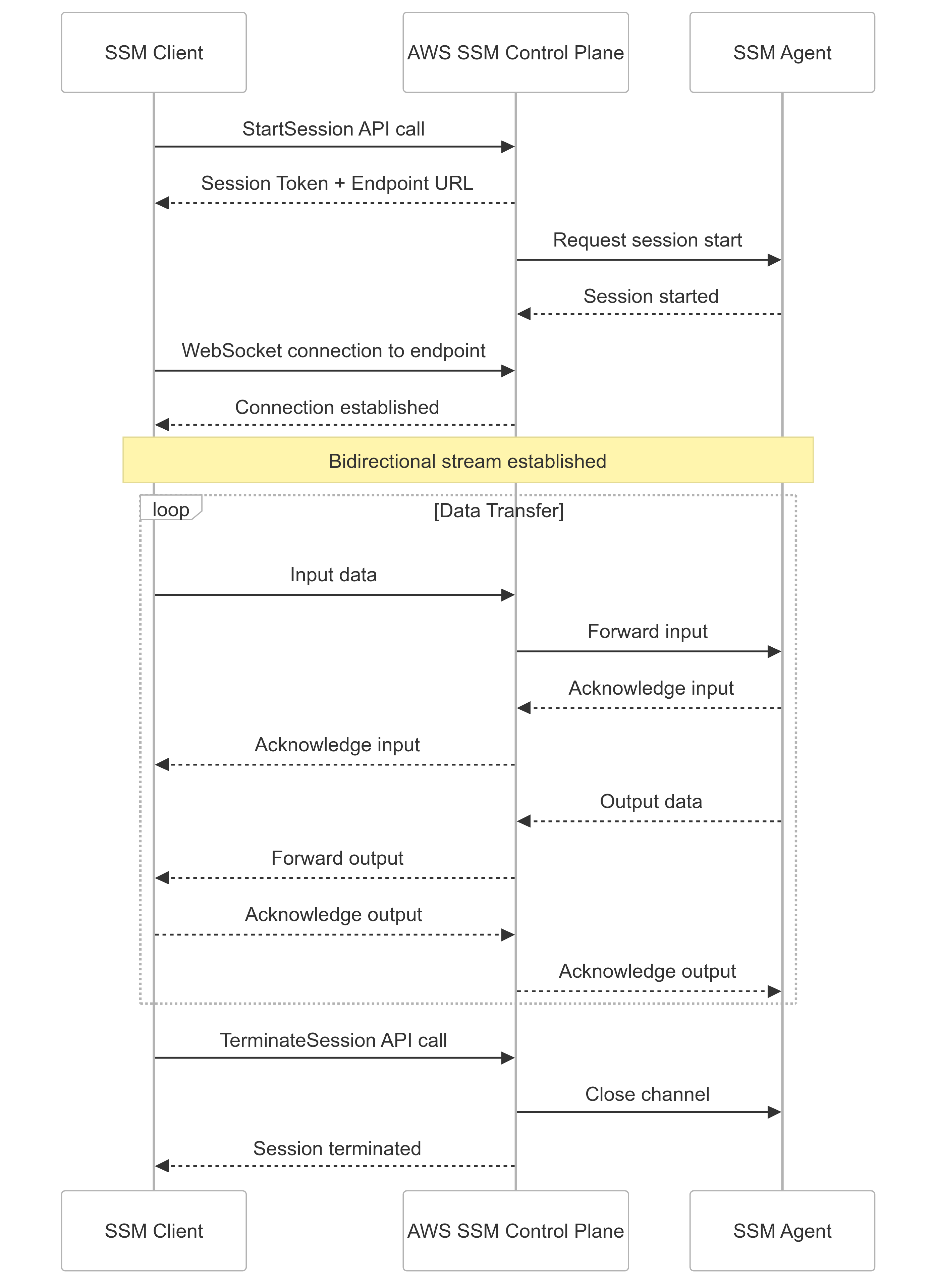
To use the AWS SDK in Go to initiate a session with an EC2 host, you can call StartSession, which returns session-related configuration. The returned session struct contains StreamUrl and TokenValue strings that can be used to dial and authenticate a websocket session with the SSM control plane. However, you'll notice that nowhere in the SDK is functionality to dial and interact with such a websocket. This is probably due to the fact that SSM sessions aren't originally intended to be interacted with programmatically. AWS provides a separate client that can be used to run these websocket sessions, but it's not easily integrable in a Go codebase as it's designed to be used as a standalone binary.
// Initiate an SSM session with an EC2 host
session, err := ssm.NewFromConfig(config).StartSession(
    context.Background(),
    &ssm.StartSessionInput{
        Target: aws.String(instanceId),
    },
)
if err != nil {
    log.Error().Err(err).Msg("Error while starting session")
    return "", "", err
}
streamUrl := aws.ToString(session.StreamUrl)
tokenValue := aws.ToString(session.TokenValue)
Communications over the data channel are conducted in the format of client messages, which are binary messages that encapsulate JSON payloads.
// SSM Client Message binary format
// +----------------+-------------------+
// | Header (116B)  | Payload (var len) |
// +----------------+-------------------+
//
// Header fields:
//   HeaderLength    uint32
//   MessageType     [32]byte  // e.g. "input_stream_data"
//   SchemaVersion   uint32
//   CreatedDate     uint64
//   SequenceNumber  int64
//   Flags           uint64
//   MessageId       [16]byte  // UUID
//   PayloadDigest   [32]byte  // SHA-256
//   PayloadType     uint32
//   PayloadLength   uint32
//
// Payload: JSON-encoded data (e.g. shell input/output)
Prior to this work, a custom library was used to handle communication over the SSM data channel. The developer spent significant time trying to make port forwarding work using that custom library, thinking that once an SSM port forwarding session started using the AWS SDK, the developer could just write to the opened data channel using the custom library to encapsulate messages. However, there was a lot more complexity than bargained for.
SSM and Port Forwarding
In a typical shell session scenario, which our library was designed for, the SSM protocol operates exactly as expected. But there's an additional wrinkle when setting up a port forwarding session.
In a port forwarding session, before any data can be sent, the agent initiates a handshake request that must be both acknowledged and responded to with a handshake response, and then the agent delivers a handshake complete message. Of course, each of these messages have their own sequence numbering as well.
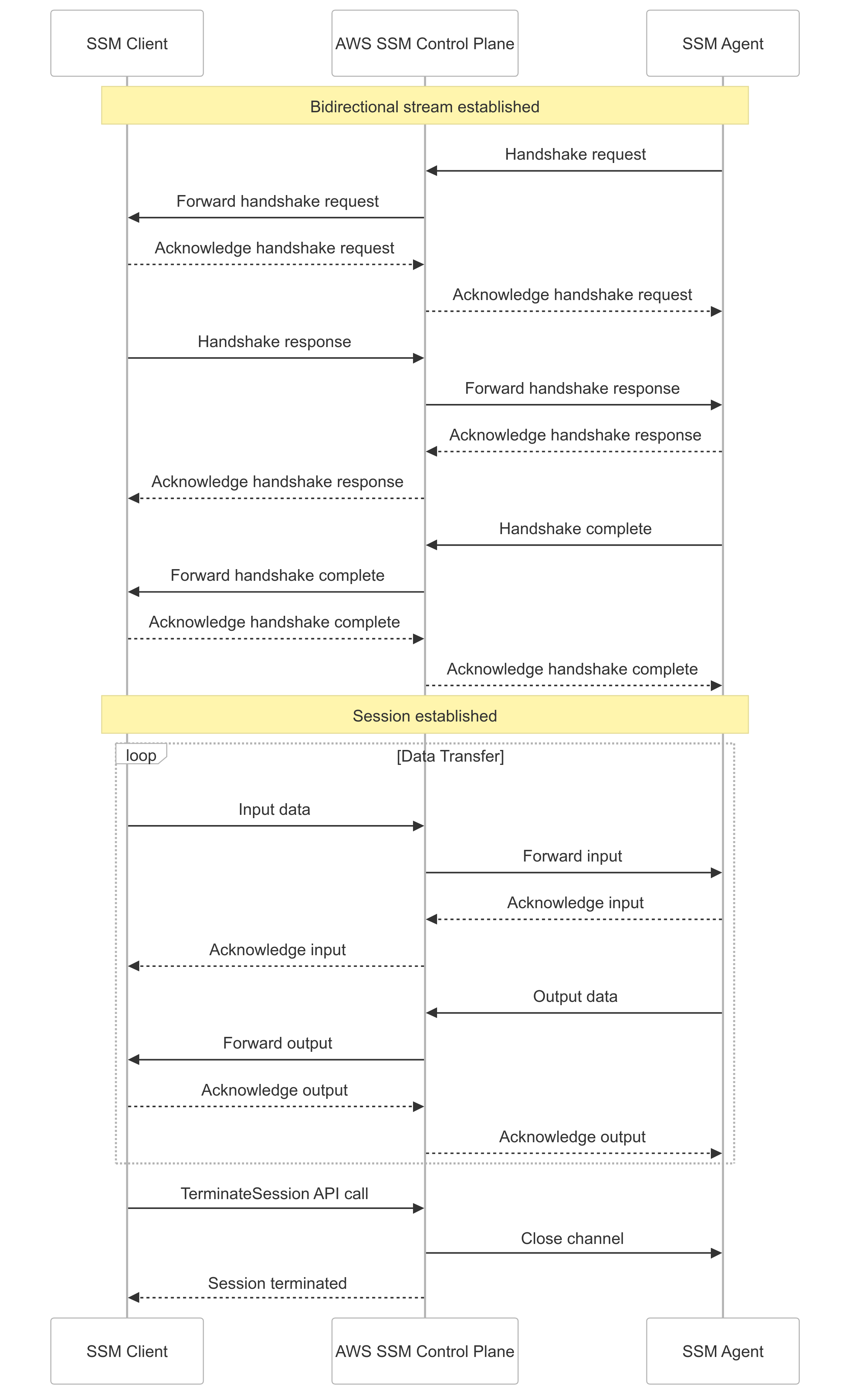
As the developer tried to implement port forwarding support, they would keep getting SSM control messages in their port forwarding data stream, leading to errors like curl: (1) Received HTTP/0.9 when not allowed. It turned out that this was because our custom library didn't have support for this handshake setup. After trying to add it, they kept running into off-by-one sequencing issues that would cause the session to freeze before any data was transferred.
Shelving that approach, the next step was to use a different, publicly available alternate SSM client that did have support. But this, as well suffered from an issue that necessitated forking it.
Intermediary SSM bugs
The SSM agent, on an AWS compute instance, uses the reported client version during the handshake to decide which features to support. The version reported by this library was old enough to trigger a bug in the agent that would inadvertently shut down the port forwarding session within 30 seconds.
Thus, the developer forked the library just to bump that version number. They integrated it with their port forwarding code, only to get these cryptic errors from agent logs on the remote end: Unable to accept stream: invalid protocol
With some digging, they came to realize that the issue was triggered by code in the agent:
// From the SSM agent source code
if session.clientVersion >= "1.1.70" {
    // Newer clients must support smux multiplexed port forwarding
    session.portSession = &muxportforwarding.MuxPortForwarding{
        outgoingMux: smux.Client(session.dataChannel),
    }
} else {
    // Older clients use basic port forwarding
    // (but have a 30-second session shutdown bug)
    session.portSession = &basicportforwarding.BasicPortForwarding{}
}
If the client reports a version high enough to avoid the session shutdown bug, it is also required to support multiplexed port forwarding over the smux protocol. Thus, they were getting the invalid protocol errors because the remote SSM agent was expecting smux frames that encapsulated SSM messages, rather than the SSM messages themselves.
So...time to implement a mux client!
...or at least they tried to implement a mux client. They even got one curl invocation working once, but then when they went to tidy up the code changes on a long Tuesday evening, they filed some PRs only to find they couldn't reproduce it. No matter what they tried, there was always some sequence numbering issue that prevented them getting useful data over the stream. It was time for a different approach.
Forking the Session Manager Plugin
The developer decided that the best way to get this working would be to simply use as much of the AWS reference protocol implementation as possible.
Despite being written in Go (just like the Formal Connector), there were both many issues preventing the AWS Session Manager Plugin from being integrated in a Go codebase and a few unaddressed bugs as well. For example, the plugin wasn't based on Go modules (despite those being the default method of structuring Go projects since 2019), and it didn't give programmatic callers any access to the data channels used to stream data. It also vendored a number of ancient dependencies, including UUID and logging libraries that hadn't been updated in a decade.
This necessitated forking it, and the first change was to apply a few patches from unmerged PRs to fix the above versioning bug and to give callers better control over session termination. They also migrated the fork to Go modules and unvendored the dependencies, and also allowed port forwarding callers to pass in a Unix socket file name that the plugin could write the data from the remote port to. Now, they could establish a port forward over the Unix socket, and then proxy bytes between that Unix socket and the client's TCP channel.
// SSM Port Forwarding via Unix Socket
//
// Client SSH Channel     Formal Connector         SSM Plugin
// +-----------------+    +------------------+    +------------------+
// | direct-tcpip    | -> | Unix Socket      | -> | SSM WebSocket    |
// | channel from    | <- | /tmp/formal_ssm_ | <- | to AWS SSM       |
// | VS Code         |    | {session_id}.sock|    | control plane    |
// +-----------------+    +------------------+    +------------------+
//
// The plugin writes port forwarding data to a Unix socket,
// and the connector proxies between that socket and the
// client's SSH direct-tcpip channel.
Now, they could reliably perform the same flow as with the SSH remote.
// Unified port forwarding flow for SSM remotes
//
// VS Code -> SSH -> Formal Connector -> Unix Socket -> SSM Plugin
//                                                         |
//                                                    WebSocket
//                                                         |
//                                                    SSM Agent
//                                                         |
//                                                    Code Server
//                                                    (port 9000)
But still, they would get errors establishing a VS Code remote SSH session over the Formal Connector, where it would still freeze while setting up the port forward.
Data races in the SSM Plugin
Turning to the connector logs, they saw data race warnings:
==================
WARNING: DATA RACE
Read at 0x00c0003a8120 by goroutine 87:
  github.com/aws/session-manager-plugin/src/datachannel.
    (*DataChannel).ProcessAcknowledgedMessage()

Previous write at 0x00c0003a8120 by goroutine 52:
  github.com/aws/session-manager-plugin/src/datachannel.
    (*DataChannel).SendAcknowledgeMessage()

Goroutine 87 (running) created at:
  github.com/aws/session-manager-plugin/src/datachannel.
    (*DataChannel).OutputMessageHandler()
==================
They would get several of these data race warnings each time they tried to curl the forwarded port. They hypothesized that this could be causing a deadlock in the VS Code scenario, which of course requests two port forwards (and therefore two SSM channels) rather than one.
So now it was time to go data race hunting. It soon became apparent that there was very little in the way of synchronization implemented in the reference implementation, despite multiple Goroutines concurrently reading and writing fields on an individual DataChannel struct.
They added a mutex to each DataChannel struct and figured out where to take and release the lock to avoid both deadlocks and data races. After making the code changes, they stopped getting data race messages in the curl scenario. Success, right?
...nope. They'd still get freezes and data races while trying to set up VS Code. After prompting with additional debugging, they finally found the last bug that was preventing VS Code from working.
By default, the Session Manager Plugin uses a "plugin registry" (a map[string]ISessionPlugin) to figure out whether it should open a shell session or a port forwarding session when receiving session configuration from the SSM control plane API. This means that there's exactly one session instance per invocation of the plugin, and trying to work with a second session instance overwrites data in the existing one — fine for a binary, less so for a library. This was obviously causing issues with VS Code, which was trying to request two port forwards.
The fix was simple: modify the plugin registry to store session type constructors, rather than live session instances. They've also opened a pull request on AWS's session-manager-plugin repository that fixes these issues they found.
After making that change (and replacing an ancient UUID library that also stored global state causing data races), they were able to get VS Code to successfully initiate Remote SSH connections to EC2 and ECS Fargate instances through the Formal Connector!
Conclusion
This functionality has since shipped, and Formal customers can now enjoy using secure, audited connections for their VS Code remote coding sessions. If you're interested in building modern, performant solutions to protect customer data in the cloud, Formal is hiring.