How does the Formal Connector work?
The Formal Connector is a protocol-aware reverse proxy that sits between identities (AI agents, users, and machines) and sensitive systems such as databases, SSH, Kubernetes clusters, and APIs. As requests flow through this Connector, teams gain visibility on requests and sessions to then enforce security policies such as blocking, masking, hashing, and more.
What data does the Formal Connector log?
The Formal Connector can see the traffic that passes through such as SQL queries, HTTP requests and responses, and stream events.
As the data that flows through the connector can be sensitive (e.g., PII, PHI), we’ve launched Fine Grained Connector Log Controls to allow admins to encrypt data (requests, response, streams), strip SQL queries, set payload sizes, and determine retention timelines.
This ensures the Connector can enforce security and access controls effectively while giving you precise control over privacy, sensitive data exposure, and compliance requirements.
An added benefit, you can bring your own encryption key (e.g., leveraging AWS KMS) to encrypt data within the Formal Connector Logs.
Log Configurations – Enabling Fine Grained Control
A Log Configuration is an object in Formal that ties three things together: Scope, Encryption/Logging settings, and Retention Rules. The log configuration is what enables fine grained control of your connector logs. They’re defined once in Terraform, visible and editable in the dashboard, and enforced in real time by the Connector.
What you can do with Log Configurations
With a single configuration, you can:
- Encrypt sensitive payloads with your own keys
- Use a managed encryption key to protect HTTP request/response bodies, SQL queries, and stream events in your logs.
- Scope logging precisely
- Apply settings at the Account level for global defaults, Connector level as a baseline, Spaces for logical separation, or at the Resource level for specific databases, instances, or buckets that need stricter controls. Resource-level rules override all broader scopes.
- Limit log payload sizes
- Cap request and response payloads independently in bytes (for example, only log the first 32 KB), so you get enough context for debugging without shipping entire blobs into Formal or your SIEM.
- Strip sensitive values from SQL
- Remove parameter values while preserving the structure of queries – ideal for analyzing patterns (e.g., tables and operations) without exposing PII/PHI.
- Tune policy evaluation input retention
- Configure how long Formal keeps the inputs used for request, response, and session policy evaluations, or disable retention entirely if your compliance posture requires it.
The result: the rich context your security and governance teams rely on, paired with significantly greater control over privacy and data minimization.
A look at the logs
Once a configuration is in place, each log entry still contains the rich context you expect. Depending on your configuration, the query may be fully encrypted, have values stripped, or be left as-is for low-risk environments. Likewise, HTTP bodies and stream events may be encrypted or truncated.
SQL Query Example
We ran a query to select from the users table for a specific user “john.doe@example.com”. In this case, the email would show in the SQL query logs in Formal which would over expose data that the Formal logs normally do not emit.
However, if you have Strip SQL Values enabled in the log configuration, the logs now strip out sensitive parts of the query.
If you have Encrypt SQL Values enabled in the log configuration, the logs now encrypt the query.
How to set it up
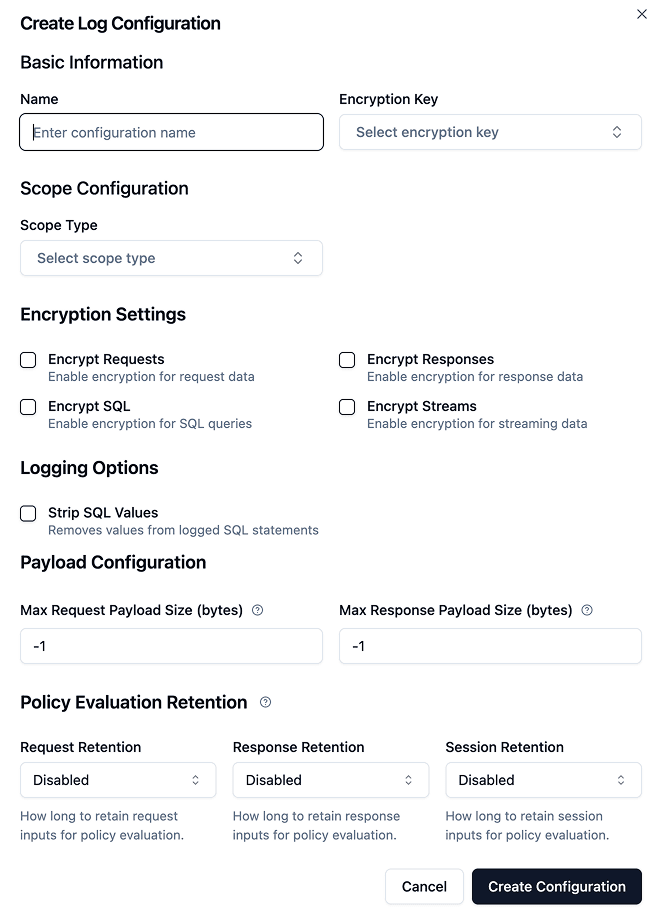
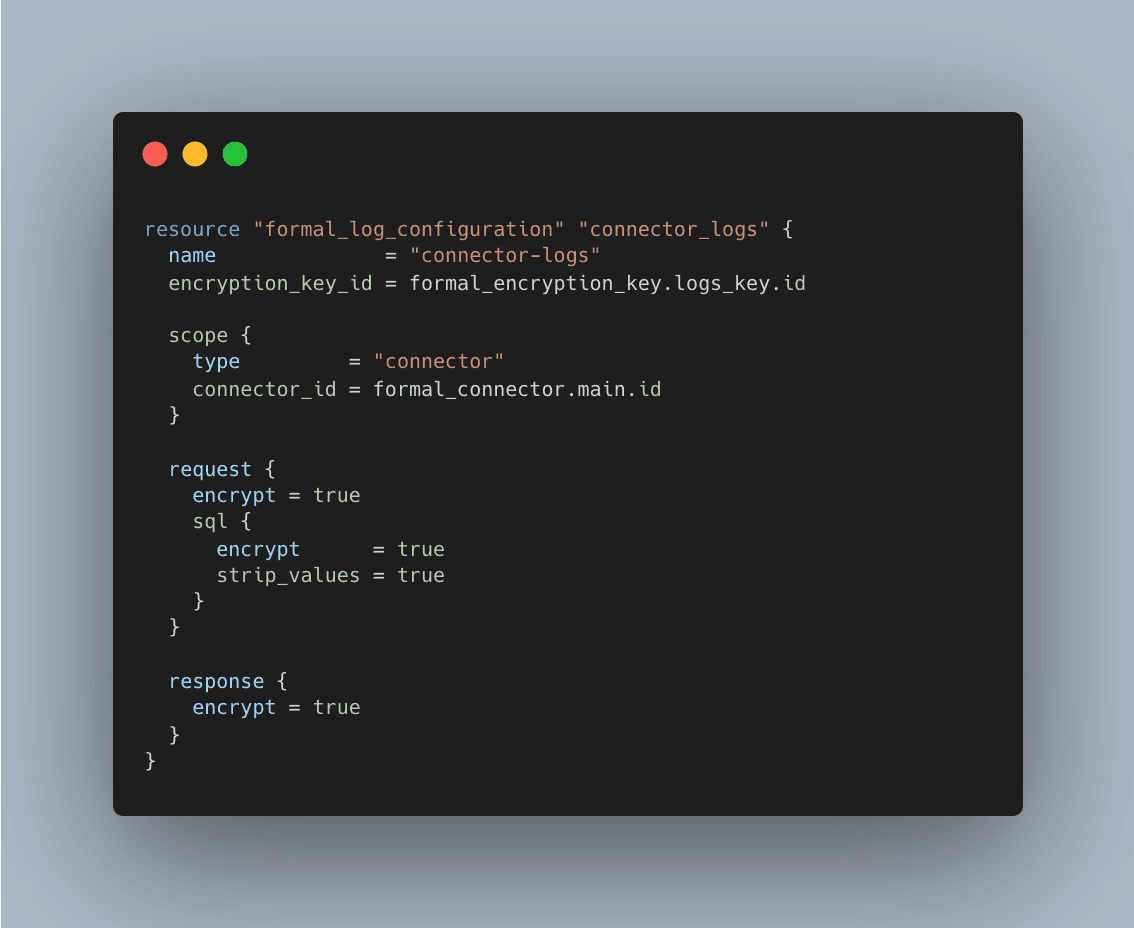
You can configure logs in two ways: via the Dashboard or Terraform.
In the Dashboard
- Go to Connectors → Logs Configuration → Create configuration.
- Give it a name and choose an encryption key (if you’re looking to set up encryption)
- Select the scope type:
• Account: Global Defaults for Your Entire Organization
• Space: Logical Separation by Environment
• Connector: all traffic through a given Connector
• Resource: only traffic for a specific database / API / bucket
- Toggle:
• Encrypt Requests / Responses
• Encrypt SQL
• Encrypt Streams
• Strip SQL values
- Set Max request/response payload size (in bytes).
- Configure Policy Evaluation Retention for request, response, and session inputs (e.g., 7 days, 30 days, or disabled).
- Click Create Configuration and the Connector will pick it up automatically.
Via Terraform
Common patterns we’re seeing
Strategies are already emerging from early adopters:
- Encrypt everything, allow only where needed
- Default: encrypt all HTTP bodies and SQL queries at the connector level.
- Override: for low-risk sandbox resources, keep bodies unencrypted but cap payload size tightly for debugging.
- Structure without values (for regulated data stores)
- Enable SQL value stripping + encryption on customer and billing databases.
- Leave normalized query structure in logs so you can still analyze which tables are accessed most often.
- Short-lived policy inputs
- Keep request/response policy inputs for a brief window (e.g., 7 days) to debug policies.
Log Configuration Roadmap
Log Configurations are available now for all customers.
Stay tuned – more features are on the way that will give you even more granular control of your logs and help you stay ahead of you infrastructure security.